Quick answer
Music school management software runs a school with several teachers from one account: registration, rooms, teacher payroll, staff roles, reports and a family portal. At November 2026 list prices, a 5-teacher school with 125 students pays from $36.75 a month (My Music Staff) to $225 (Pike13 with payroll). Jackrabbit Music and Opus1 charge by student count, Teachworks by lesson, My Music Staff and Sonely by teacher.
Key takeaways
- At November 2026 list prices, a 5-teacher school with 125 students pays from $36.75 a month (My Music Staff) to $225 (Pike13 Advanced, which adds payroll).
- My Music Staff and Sonely charge per teacher login, Jackrabbit Music and Opus1 by student count, Teachworks by the lesson and Pike13 a flat plan with unlimited staff.
- Per-teacher pricing favors full rosters, while per-student pricing favors many part-time teachers: with 10 students each, Jackrabbit costs $89 a month at 15 teachers.
- Most of these systems work out what each teacher has earned but don’t send the money, so you still pay teachers your usual way.
- Jackrabbit and Opus1 offer free help importing your data; with Sonely you import students, families and teachers yourself, without past lessons or invoices.
On this page
- Quick comparison
- How we chose and compared these tools
- What does a music school need that a private studio doesn’t?
- Music school management software compared
- How much does music school software cost at 5 and 15 teachers?
- How should a music school handle teacher payroll?
- How does music school software connect to your website and marketing?
- How to test music school software in a free trial
- How do you switch music school software?
- Music school software reviewed, A to Z
- Also worth a look
- What is the best music school software for your school?
- Questions
Music school management software runs a school with several teachers from one account: registration, scheduling across rooms, billing, attendance, teacher payroll, staff permissions, reports and a family portal. Schools go looking for it when tools built for one teacher stop fitting: rooms get double-booked, teacher pay is added up by hand, and every staff login sees revenue.
This page compares six systems on those jobs, listed alphabetically rather than ranked, and works out what each costs at 5 and 15 teachers at November 2026 list prices.
Sonely publishes this guide and is one of the six systems.
Quick comparison
| Product | Best for | Starting price | Key difference | Review |
|---|---|---|---|---|
| Jackrabbit Music | Lessons plus classes, camps and registration | $49/mo, up to 100 students | Priced by student count; locations at no extra fee | Read → |
| My Music Staff | Schools of 2 to 15 teachers on full rosters | $16.95/mo, $4.95 per extra teacher or staff | Lowest list price per teacher | Read → |
| Opus1 | Music schools with recitals and a front desk | $99/mo per location, up to 200 students | Built for music schools; free import help | Read → |
| Pike13 | Several locations or a franchise | $159/mo ($139 billed yearly) | Flat plan with unlimited staff; client and staff apps | Read → |
| Sonely | Small schools that want teaching tools and admin in one | First seat free, $5/mo per extra seat | Payroll from billed lessons; practice, library and website included | Read → |
| Teachworks | Many part-time teachers, or subjects beyond music | $16.49/mo + $0.35 per student lesson | Unlimited teachers and users, priced by the lesson | Read → |
Prices are monthly list prices in US dollars as each company’s pages showed them in November 2026.
How we chose and compared these tools
What qualified. A system is here if it runs a school with several teachers from one account (teacher logins, roles and teacher pay worked out for you), publishes its prices on its own site, and was live and selling in November 2026. Tools that came up but don’t fit a whole school, or that we couldn’t check, are under “Also worth a look”.
How we compared them. On registration, rooms, payroll, roles, reports and the family portal, and on what each costs at 5 and 15 teachers with the assumptions given below. Every fact about another company comes from its own website and help center, read in November 2026 and listed under Sources at the end. “Not found” means we didn’t find it on the company’s own pages.
How they’re ordered. Alphabetically, except the cost table, which runs from the lowest price at 5 teachers. “What is the best music school software for your school?” at the end matches systems to situations instead of ranking them.
Our conflict of interest. Sonely publishes this guide and is one of the systems. Its entry has the same sections as the others, and our editorial standards explain how we check every claim.
What does a music school need that a private studio doesn’t?
A school needs music school software that works for a team, not just one teacher. On top of lessons, billing and a family portal, look for:
- Registration. Sign-up forms, trial lessons and class enrollment that put new families on your list without retyping.
- Scheduling, rooms and locations. Music school scheduling software should put every lesson in a room and catch clashes before they happen.
- Teacher payroll. Pay worked out from the lessons each teacher taught, including substitutes and make-ups.
- Roles and permissions. Teachers see their own students; the front desk sees families and invoices; only owners see revenue.
- Reporting. Attendance, retention, revenue and payroll across the whole school.
- A family portal. One login per family, with every child, lesson and invoice in it.
Music school management software compared
Here are the six side by side, A to Z.
| Tool | How it charges | Registration | Rooms | Teacher payroll | Roles | Family portal |
|---|---|---|---|---|---|---|
| Jackrabbit Music | By student count | Online class registration, waivers | No double-booked rooms or teachers | Time clock; hours exported | Permissions per user, by area | Parent Portal; branded app with Plus |
| My Music Staff | Per teacher or staff login | Booking forms, website widgets | Locations to avoid double-booking | Hourly or % of revenue | Per person | Student Portal |
| Opus1 | By active students, per location | Enrollment, self-booking, trial conversion | Room utilization dashboards | Hourly or fixed rates, from lessons | Four staff roles | Self-service portal |
| Pike13 | Flat plan, unlimited staff | Enrollment, waitlists, waivers | Room bookings (Advanced) | Payroll and time tracking (Advanced) | Five staff roles | Family accounts and client app |
| Sonely | Per teacher, admin or staff seat | Sign-up forms, trial lessons, booking | Rooms and places, clash checks | Hourly or % of revenue | Owner, teacher, office staff, per person | Family portal in the browser |
| Teachworks | Base fee plus each student lesson | Website booking add-on | Not found | Earnings from lessons | Permissions by role | Student and parent accounts |
How much does music school software cost at 5 and 15 teachers?
At November 2026 list prices, a school with 5 teachers pays between $36.75 and $225 a month, and a school with 15 teachers between $86.25 and $307.99, depending on the tool. To compare like with like, we assumed:
- 25 students per teacher, each on weekly private lessons (about 4 lessons a month).
- So 125 students and about 500 student lessons a month at 5 teachers; 375 students and about 1,500 at 15.
- One location, no office staff logins, monthly billing, and no payment processing fees.
| Tool | How the price is set | 5 teachers (125 students) | 15 teachers (375 students) |
|---|---|---|---|
| My Music Staff | $16.95 plus $4.95 per extra teacher or staff | $36.75 | $86.25 |
| Sonely | First seat free, $5 per extra seat | $20 | $70 |
| Jackrabbit Music | Tiers by total students | $89 (101 to 250 students) | $129 (251 to 500) |
| Opus1 | Tiers by active students, per location | $99 (Starter, up to 200) | $199 (Growth, up to 500) |
| Teachworks | Base fee plus each student lesson | $152.99 (Growth) | $307.99 (Premium) |
| Pike13 | Flat plan | $159 (Essential), $225 with payroll (Advanced) | $159 (Essential), $225 with payroll (Advanced) |
Notes on the numbers:
- Teachworks: we used whichever plan is cheapest at that volume. Growth is $47.99 plus $0.21 per student lesson; Premium is $187.99 plus $0.08.
- Pike13: billed yearly, Essential is $139 a month and Advanced $195. Payroll needs Advanced.
- Opus1: prices are from its AI reference page; its pricing page gives the starting price as $98 in one place and $99 in another.
- Jackrabbit: Jackrabbit Plus, with a branded parent app, starts at $93 a month plus a $169 setup fee.
- Office staff: a front-desk login adds $4.95 a month with My Music Staff and $5 with Sonely. Pike13 includes unlimited staff seats and Teachworks unlimited user accounts.
- Payments: Sonely and My Music Staff connect to your own Stripe or PayPal account, Pike13 works with Stripe, EVO, Paysafe, IntegraPay or Celero, and Teachworks names Stripe. Jackrabbit Pay starts at 2.59% + $0.30 per card payment, and Opus1 doesn’t publish its rate.
Rosters change the picture. If your teachers are part-time with about 10 students each, Jackrabbit drops to $49 a month at 5 teachers and $89 at 15, close to My Music Staff’s $86.25. Per-teacher pricing favors full rosters; per-student pricing favors many part-time teachers. Sonely’s pricing page has a seat slider that adds up the total for your own team.
How should a music school handle teacher payroll?
The best music teacher payroll setup works out each teacher’s pay from the lessons they actually taught, so payroll becomes a report you check rather than a spreadsheet you build. Decide three things first:
- The pay model. A flat hourly rate, a percentage of each lesson’s revenue, or a different rate for group classes and recitals.
- Make-ups. Pay when a make-up credit is issued, or only when the make-up is taught.
- Substitutes. Pay should follow whoever taught the lesson.
Whether your teachers are employees or independent contractors is a separate question, and software won’t answer it. The IRS says it depends on the business’s right to direct and control the worker, weighed across behavioral, financial and relationship evidence. Ask an accountant before you set teachers up either way.
How does music school software connect to your website and marketing?
Music school software should turn your website into the front desk: booking or registration forms on your own site, new families landing in the system as leads or students, and a way to keep in touch with families who haven’t enrolled yet. The six differ most on that last part, as of November 2026.
| Tool | On your website | Reaching families and prospects |
|---|---|---|
| Jackrabbit Music | Class listing tables, the online registration form and the Parent Portal link, added by code or a direct link | The same registration links, shared by email or social media |
| My Music Staff | A website builder with templates, plus sign-up widgets, booking forms and the Student Portal login for a Wix, Squarespace or WordPress site | Registration and booking forms that can book a first lesson and take payment |
| Opus1 | A custom URL, self-booking and automated trial conversion | Mailchimp sync on every plan; the Opus1 Plus add-on adds email and SMS campaigns to prospects and parents (no published price, and SMS needs an Opus1 SMS plan) |
| Pike13 | Website integration with widgets, on Advanced | Email marketing and SMS messaging, on Advanced |
| Sonely | A website builder with five templates on your own domain, or sign-up, booking, contact, family login and reviews widgets for the site you have | Sign-ups tagged by form or season, emails to a class or tag, news posts to the portal and website blog, and widget sign-ups reported to your site’s Google Analytics and Meta Pixel |
| Teachworks | Features you set up in Teachworks and paste as code on your site, with a Website Bookings add-on for lessons and open classes | Automated reminder emails, SMS reminders as an add-on, and Mailchimp among its integrations |
Whichever you choose, test the path a new family takes: fill in your own form on a phone and see where the record lands and who is told.
How to test music school software in a free trial
A demo shows the software at its best, so test it on your own school’s hardest week instead. Use real teachers, rooms and families rather than the sample data, and try each of these before the trial ends:
| What to test | How to test it |
|---|---|
| Rooms | Book two teachers into the same room at the same time and see whether it warns you |
| Substitutes | Give one lesson to a substitute and check whose pay it adds to |
| Make-ups | Mark one lesson cancelled with notice and one a no-show; check the bill, the make-up credit and the teacher’s pay |
| Roles | Sign in as a teacher and as front-desk staff, and check what each can see, revenue included |
| Families | Put two siblings with different teachers in one family; the parent should see both on one login and one invoice |
| Registration | Fill in your sign-up form as a parent and see where the new student lands |
| Reports | Run attendance and payroll for a month and compare them with your own records |
| Import | Import a spreadsheet of 20 real families and count what you fix by hand |
How do you switch music school software?
Give a switch a few weeks, timed for a term break: time to set it up and test it, then one month of invoices and payroll checked against the old system. The family list is the easy part. Rebuilding rooms, availability, pay rates and the weekly schedule is what takes the time, so do it in this order:
- Pick the start date at a term break or the start of a month, and stop making changes in the old system the week before.
- Import families, students and teachers. Jackrabbit and Opus1 offer free help importing your data. With Sonely, you import students and families from a CSV or Excel file and teachers from a CSV file yourself.
- Set up rooms, availability and pay rates before any lessons, so clash checks and payroll work from the first week.
- Rebuild the weekly lessons and opening balances. Check what your new system can import. In Sonely, import students and families from a spreadsheet, and each family starts from the balance you enter.
- Give every teacher and front-desk person their own login, and check what each role can see before families arrive.
- Run one month in the new system, compare its invoices and payroll with the old one, then invite families with one message: the portal link, how to pay and who to ask.
Music school software reviewed, A to Z
Listed alphabetically, not ranked.
Best for lessons plus classes and camps
Jackrabbit Music: classes, registration and locations
Jackrabbit Music is Jackrabbit’s software for music schools, running on Jackrabbit Class, which also serves dance, swim and other class programs.
Best for: schools that run classes, camps and programs as much as private lessons.
Pricing (as of November 2026): $49 a month for up to 100 students, $89 for 101 to 250 and $129 for 251 to 500: $89 at 5 teachers (125 students) and $129 at 15 (375). Jackrabbit Plus, with a branded parent app, starts at $93 a month plus a $169 setup fee.
Strengths:
- Online class registration, with policies and waivers by class, program or level.
- Private lessons scheduled by room and teacher availability without double-booking, and as many locations as you need at no extra fee.
- Permissions per user, by area (families, classes, transactions, reports and more), with templates you can clone for each role.
- A reporting feature, plus a business intelligence dashboard with Enterprise.
- Free help importing your data.
Limits: Card payments go through Jackrabbit Pay, from 2.59% + $0.30. Its staff time clock exports hours to payroll software or a spreadsheet rather than working out pay per lesson.
Lowest list price per teacher
My Music Staff: the lowest price per teacher
My Music Staff is studio management software for private teachers and studios, and its site says it has served them since 2013. It adds teachers and staff one login at a time.
Best for: schools of 2 to 15 teachers on full rosters, mostly teaching private lessons.
Pricing (as of November 2026): $16.95 a month for the first teacher plus $4.95 for each extra teacher or staff member: $36.75 at 5 teachers and $86.25 at 15.
Strengths:
- Booking forms tied to teacher availability, and a website builder with widgets.
- Locations to avoid double-booking, with teachers’ availability assigned to specific locations.
- Payroll at a flat hourly rate or a percentage of revenue, with category overrides.
- Permissions per person, and reports such as Income and Expenses, Billable Hours and Payroll, as PDF or Excel.
- A Student Portal for families.
Limits: You pay from the first teacher, and every front-desk login is a paid seat.
Best for music schools with recitals and a front desk
Opus1: built for music schools
Opus1 is management software for music and performing arts schools.
Best for: schools of 5 to 15 teachers with recitals, a front desk and up to 500 students.
Pricing (as of November 2026): by active students, per location: Starter $99 a month for up to 200 and Growth $199 for up to 500, according to its AI reference page. Its pricing page gives the starting price as $98 in one place and $99 in another.
Strengths:
- Class setup and enrollment, self-booking, automated trial conversion and proposals, and smart waitlists.
- Room utilization dashboards, and recital and showcase planning.
- Hourly or fixed pay rates, with hours from appointments, classes, events and paid availability, exported as CSV.
- Four staff roles (Limited staff, Staff, Managers and Owners); managers can run payroll but can’t see revenue.
- Advanced reporting broken out by location. Locations can share one Opus1 business, and payments can go to a separate bank account per location.
- Free help importing your data.
Limits: Each location is priced separately, it says it doesn’t process payouts, taxes or withholding, and it doesn’t publish its card processing rate.
Best for multi-location schools and franchises
Pike13: flat plans and unlimited staff
Pike13 is business software for schools that sell classes, lessons and memberships, from music schools to swim schools.
Best for: schools with several locations, large staffs or a franchise.
Pricing (as of November 2026): Essential is $159 a month ($139 billed yearly) and Advanced $225 ($195), the same at 5 or 15 teachers. Payroll needs Advanced.
Strengths:
- Unlimited staff seats on every plan.
- Scheduling and enrollment for classes, courses and appointments, automated waitlists, and digital waivers on Advanced.
- No double-booked teachers or rooms, and room bookings on Advanced.
- Several locations under one merchant account in one flat plan, a business intelligence dashboard, custom reporting on Advanced, and roll-up reporting across locations.
- Five staff roles (primary owner, owners, managers, staff members and limited staff, who see only their own schedule and can’t take payments).
- Family accounts and a client app, and a choice of Stripe, EVO, Paysafe, IntegraPay or Celero.
Limits: Payroll, room bookings and waivers need Advanced, and franchises with separately owned locations pay more. Its music page doesn’t mention make-ups, practice tracking or recitals.
New in November 2026
Sonely: a free first seat and per-seat pricing
Sonely is studio management software for private teachers and music schools, made by the team that publishes this page.
Who it fits: small schools, mostly private lessons, that want practice tracking, a lending library and a studio website alongside the admin.
Key features for a school:
- Registration: sign-up forms and booking turn each sign-up into a lead or student with a family and contacts, tagged by form or season, with the instrument and preferred teacher they chose. Families can book a free, discounted or paid trial lesson from a teacher’s availability, and the forms work on any website.
- Rooms and locations: list every room and place you teach, and Sonely warns before a teacher, student or room is booked twice. Locations cost nothing extra, and families at every location share one portal and one family account. See multi-location schools.
- Payroll: teacher payroll adds an entry for every billed lesson, at an hourly rate or a share of revenue, with different rates by category. You choose when make-ups are paid, substitutes are paid at their own rate, and the Payroll report shows what each teacher earned. It’s gross pay, ready for however you pay your teachers.
- Roles: the owner sees everything. Teachers see their own lessons and students, and their own payroll if you allow it. Office staff get admin logins without a calendar. Permissions cover taking attendance, seeing other teachers’ events, managing students, managing invoices and recording payments, and reports, expenses and mileage each have their own.
- Reports: fifteen reports, including Student attendance, Student retention, Lessons taught, Billable hours, Family account balance, Payroll, Revenue and expense, and Sales tax, as PDF or Excel, by cash or accrual.
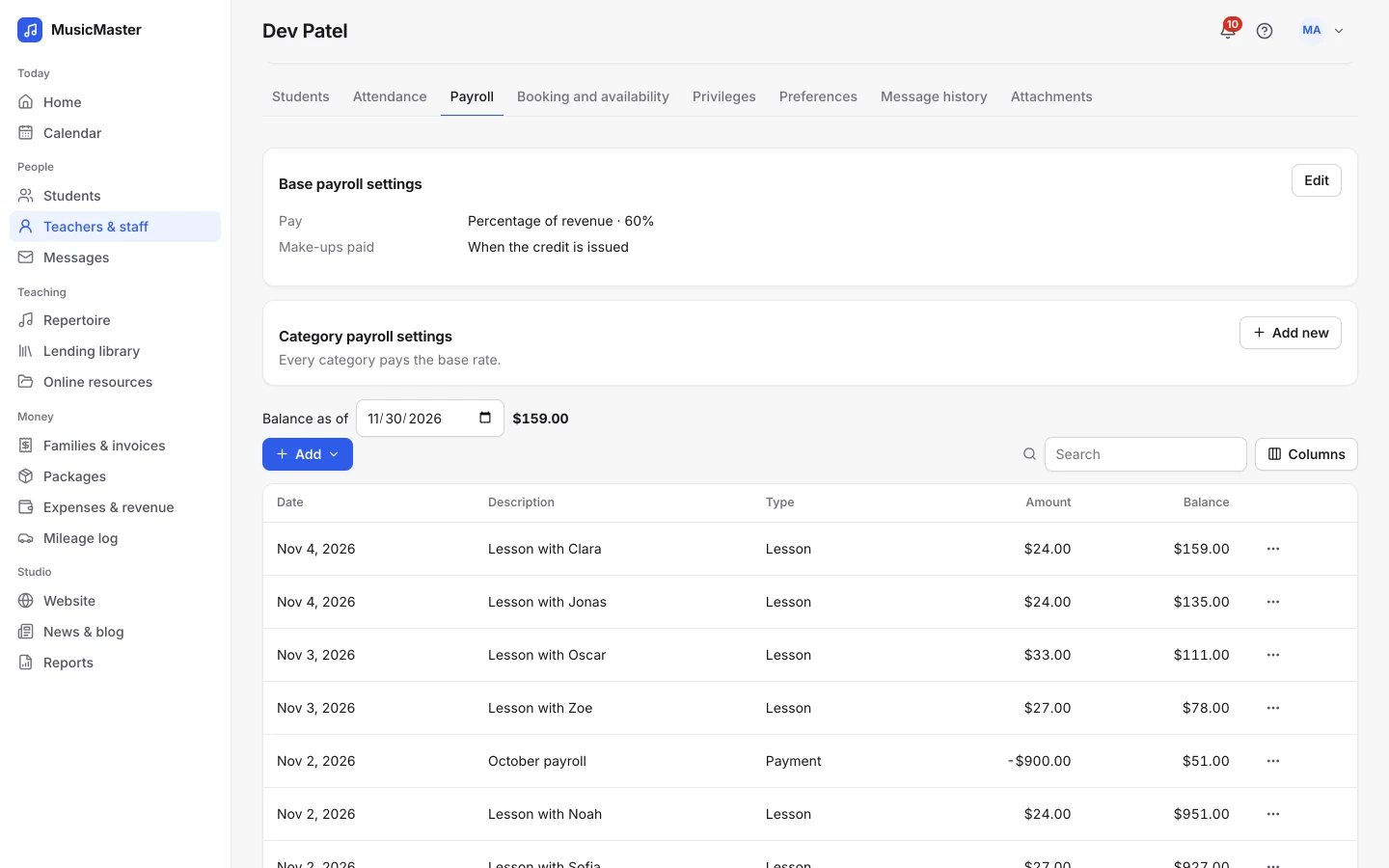
Each teacher’s Payroll tab shows how they’re paid and every lesson that added to their balance, so the month-end total is already there when you pay them.
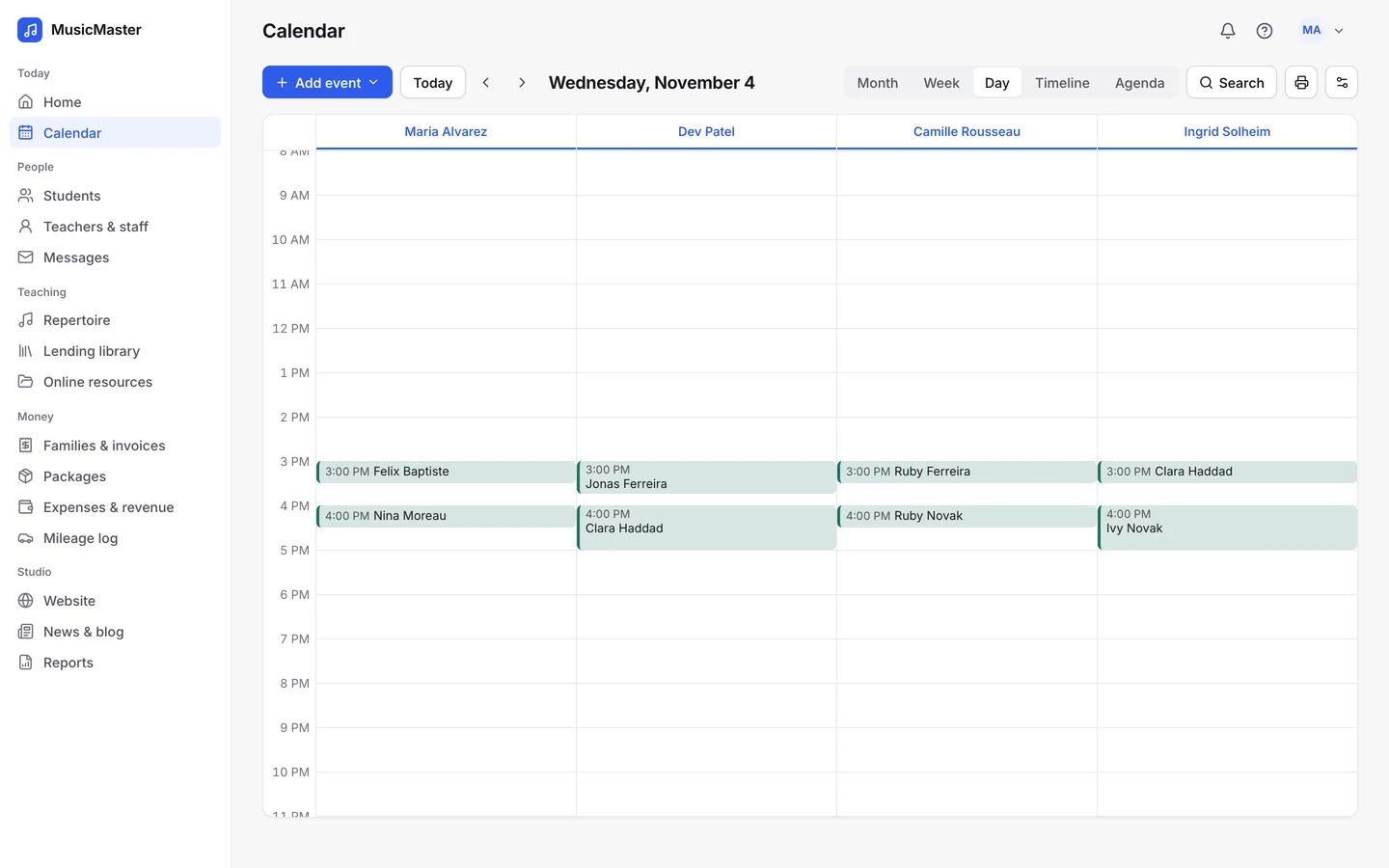
The calendar’s Day view gives each teacher a column, so the front desk sees the whole school’s day side by side.
Pricing (as of November 2026): the first seat is free, and each extra teacher, admin or staff seat is $5 a month: $20 at 5 teachers and $70 at 15. Extra seats are free for a new studio’s first 30 days, and there’s a full refund within 90 days.
Next step: see how a school runs in it on Sonely for music schools.
Best for many part-time teachers
Teachworks: priced by the lesson
Teachworks is scheduling and billing software for tutoring centers and language, music and driving schools.
Best for: schools with many part-time teachers, or schools that teach more than music.
Pricing (as of November 2026): a base fee plus each student lesson: Starter $16.49 plus $0.35, Growth $47.99 plus $0.21, Premium $187.99 plus $0.08. That’s $152.99 at 5 teachers (Growth) and $307.99 at 15 (Premium) on our assumptions.
Strengths:
- Unlimited teachers and user accounts.
- Teacher hours and earnings calculated from the lessons on the calendar, and permissions by role.
- A Website Bookings add-on lets students book lessons or join open classes from your site.
- A master account manages branch accounts with consolidated results. Premium includes 5 branches, and each extra branch is $35 a month.
- Customizable reports by period, status, service, teacher, student and location.
Limits: The bill grows with every lesson you teach, and we didn’t find room scheduling on its pages.
Also worth a look
- My Music Lessons is booking and admin software built and run by a working music school, with prices in pounds. School accounts add branding, several teachers and rooms, automated commission splits and teacher payouts, and a self check-in screen, and there are iOS and Android apps. A school pays £9.95 a month plus £2.95 per teacher after a one-month trial, with card payments through Stripe.
- Koalendar is booking software rather than full school management: recurring bookings, packages, waitlists and room allocation, with Stripe or PayPal payments and no commission on the Pro plan. The Free plan costs nothing, and Pro is $9.99 per seat a month ($6.99 billed yearly), where a seat is a person or a room that can be booked. Its own comparison says it has no teacher payroll.
- TutorCruncher is built for tutoring companies rather than music schools. Its Pay as you go plan is £25 a month plus 2.65% of card payments, with a two-week trial.
- Duet Partner, formerly Music Teacher’s Helper, is set up for a single teacher, so it doesn’t fit a school.
- Jumbula also comes up in searches for music school software, but its site blocked our checks, so we couldn’t confirm its prices or features.
What is the best music school software for your school?
There isn’t one best music school software for every school: the right one depends on how it charges (per teacher, per student, per lesson or a flat plan) and on what drives your enrollment.
- 2 to 3 teachers, mostly private lessons: Sonely, which costs less than My Music Staff at every size ($5 or $10 a month at two or three teachers).
- 5 to 15 teachers with recitals and a front desk: Opus1 for recital planning and staff roles, or Sonely for the lowest total list price ($20 a month at 5 teachers, $70 at 15).
- Lessons plus classes, camps and registration: Jackrabbit Music or Pike13, for class registration, waivers and apps.
- Many part-time teachers, or subjects beyond music: Teachworks, with unlimited teachers and users, priced by lesson.
- Several locations or a franchise: Pike13, Opus1 or Jackrabbit Music, for roll-up reporting, payments per location or locations at no extra fee.
If you’re weighing a move away from one of these, see Pike13 alternatives and Teachworks alternatives, or compare every option, school and private studio alike, in our comparison of music studio management software.