
Sonely vs. Opus1: Studio software for music schools
Opus1 prices each location by its active students. Sonely prices by teacher, with unlimited students. Here’s how they compare, from each one’s own pages.
What makes Sonely different than Opus1?

One price per teacher
Your price follows the teachers who log in, not your student count or your locations.

Booking on your own site
Embed booking from teacher availability or from your calendar on any website.

Made for practice at home
Repertoire, practice logs with recordings and a lending library come with every plan.

Try it yourself today
Start free with one teacher, every feature and no card, or look around the demo studio.
Sonely vs. Opus1
Studio management for music schools of every size.
Opus1 is made for music and performing arts schools. Here are the two side by side, with Opus1’s answers taken from its own pages.
| Features | Sonely | Opus1 |
|---|---|---|
| How the price is set | Per teacher seat | Active students, per location2 |
Free | $99/mo1 | |
| Month to month | ||
Opus1’s pricing page links to a free trial that books a walkthrough. Its AI reference page says trials may be available from the sales team on request2. | Free plan | Unknown |
Sonely refunds you in full within 90 days of creating your account. Opus1’s terms say all purchases are non-refundable3. | 90 days | |
| Private lessons and group classes | ||
| Families book lessons and make-ups online | ||
| Make-up credits | ||
| Auto-invoicing and auto-pay | ||
| Late fees | ||
Sonely sends payments to your own Stripe or PayPal account, at the fees you agreed with them. Opus1 says processing fees apply with Opus1 Payments or Stripe2; we didn’t find a published rate. | Your Stripe or PayPal | Opus1 Payments or Stripe2 |
| Family portal | ||
We didn’t find a website builder on Opus1’s pages. Its plans include a custom URL1. | Unknown | |
Opus1’s help center says not to embed its booking flow in site builders and to link to it instead; its lead-capture form can be embedded9. | Link out9 | |
Sonely texts lesson and invoice reminders from its own number to families who allow texts, included in the plan. Opus1 SMS, with two-way texting, is a paid add-on1. | Add-on1 | |
Unknown | ||
| Lending library | Unknown | |
| Teacher pay worked out for you | ||
| Expense tracking | Unknown | |
| Reports | ||
| Webhooks | ||
Sonely’s API keys work from tools like Zapier. Opus1 lists Zapier with its Opus1 Plus add-on1. | API keys | With Plus add-on1 |
Opus1 imports your first client list for you at no charge14. With Sonely, you import your students from a CSV or Excel file yourself. | Do it yourself | Free first import14 |
Neither has one: Sonely runs in any phone’s browser, and Opus1’s help center explains adding it to your home screen12. | ||
| Interface languages | 6 | Unknown |
Prices are monthly list prices in US dollars, as each company’s pages showed them.
Where Sonely and Opus1 differ
Pricing
A price that follows your teachers
- Sonely: free for one teacher and $12 a month for each extra teacher, admin or staff seat, with unlimited students and no charge per location.
- Opus1 prices each location by its active students, from $99 a month for up to 200 students2.
- Sonely refunds you in full within 90 days. Opus1’s terms say purchases are non-refundable3.

Website
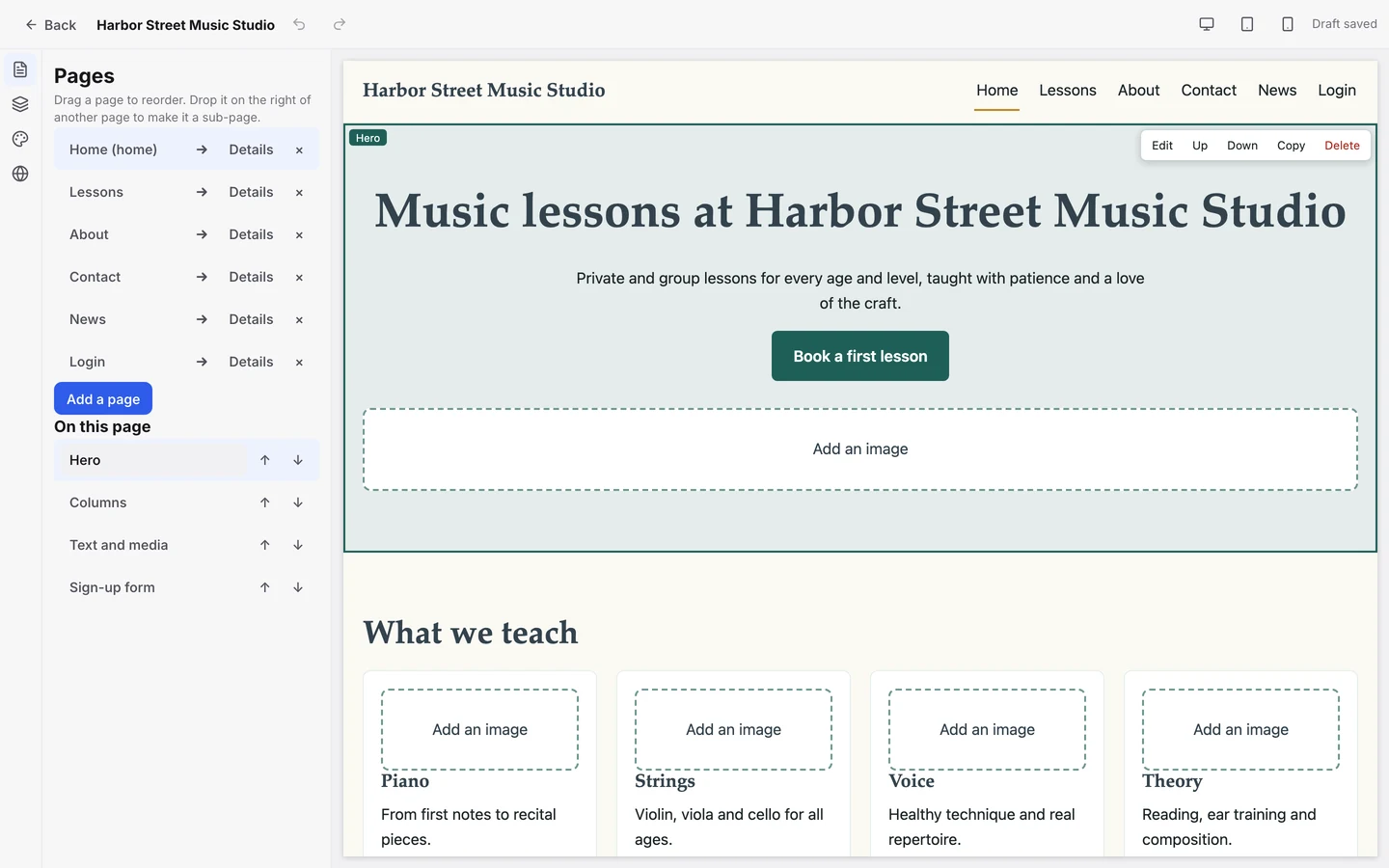
Booking that lives on your website
- Embed Book from availability or Book from calendar on any website.
- Or build your studio site in Sonely, on your own domain.
- Opus1 asks you to link out to its booking page rather than embed it9.
Teaching
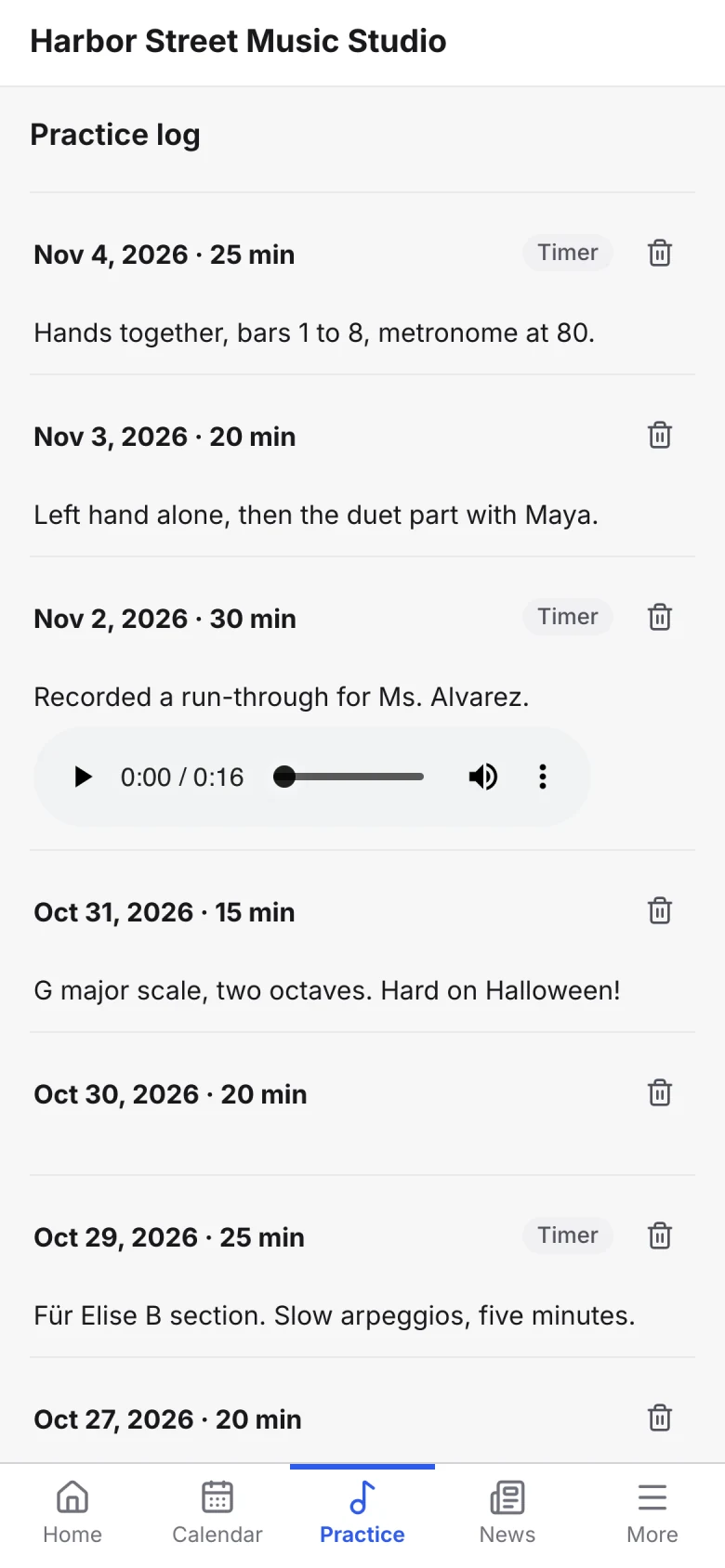
Built around practice between lessons
- Students log practice with a timer and upload recordings for you to hear.
- Assign pieces from your repertoire library and follow each student’s progress.
- Lend books and instruments, and see what’s overdue.
Credit where it’s due
What Opus1 does well
- It was built by people who ran music schools, and more than 1,000 schools use it, its site says15.
- Recital and performance management, with performer and repertoire tracking4.
- Two-way SMS as an add-on, and free migration support and a named support rep on every plan1.
- Plans for schools with several locations16.

Frequently asked questions about Sonely and Opus1
You can also reach out to our support team or try the demo studio to see Sonely for yourself.
Yes. Both handle lessons, make-ups, billing and a family portal. Sonely adds practice logs, a lending library and a website, and prices by teacher. If you want two-way texting and recital management, Opus1 may suit you better. Try the demo studio to see for yourself.
Opus1 prices each location by its active students, from $99 a month for up to 2002. Sonely is free for one teacher and $12 a month for each extra teacher, admin or staff seat, however many students and locations you have.
Import your students and families from a CSV or Excel file, and your teachers from a CSV file. Lessons, invoices and expenses can’t be imported, so you set up your weekly lessons and opening balances when you start. Contact us if you get stuck.
Yes. Add the Book from availability or Book from calendar widget to any website, or build your site in Sonely. Bookings follow your rules for notice, booking window and cancellations.

Try the demo
Look around a sample studio with students, lessons and invoices already in place.
Open the demo studio
Talk to us
Ask us anything about running your studio on Sonely. Real people read and answer.
Contact us about Sonely
See what’s new
Every update we ship, in one place. See what changed in each release.
Read the changelog