Quick answer
Music practice apps come in two kinds. Practice tools help a student practice better: TonalEnergy or Soundbrenner for a metronome and tuner, Amazing Slow Downer or Moises to slow recordings, forScore for sheet music. Practice trackers show the teacher what happened at home: Practice Space, Vivid Practice and Better Practice, or the practice log in studio software such as My Music Staff or Sonely. Tonara shut down in 2023.
Key takeaways
- Most music students need two apps: a practice tool such as a metronome, tuner or slow-downer, and a practice tracker that shows the teacher what happened at home.
- Tonara closed in 2023, and three of the apps teachers moved to, Practice Space, Vivid Practice and Better Practice, were active in November 2026.
- With 30 students, Practice Space Plus costs $15.99 a month for one teacher, Vivid Practice $29 and Better Practice $127.50 if every student is on its plan; studio software with a practice log costs $16.95 on My Music Staff and nothing on Sonely for one teacher (November 2026).
- In a 2009 study of piano majors, how long they practiced had no significant relationship with how well they played the next day; how they practiced did.
- Ask students for a note on what they worked on and a short recording, not only minutes on a timer.
On this page
- Quick comparison
- How we chose and compared these tools
- What are the two kinds of music practice apps?
- Is Tonara still running?
- Practice tools for students
- Practice tracker apps between teacher and student
- What about Simply Piano, Yousician and flowkey?
- What can a practice app not do?
- How do you plan a practice session in an app?
- Which one should you choose?
- Questions
Students go looking for a music practice app when practice at home feels aimless, and teachers go looking when they can’t see what happened between lessons, more so since Tonara, the tracker many piano studios used, closed in 2023. Most students need two apps: a practice tool that makes the minutes count (a metronome, a tuner, a slow-downer) and a practice tracker that shows the teacher the week. This page compares 12 in 2026, six of each, with platforms and November 2026 prices. Each group is listed alphabetically, not ranked.
Sonely publishes this guide and is one of the six trackers, as studio software with a practice log.
Quick comparison
The first six are practice tools a student uses alone; the last six are trackers that connect teacher and student. Each group is listed alphabetically.
| Product | Best for | Starting price | Key difference | Review |
|---|---|---|---|---|
| Amazing Slow Downer | Learning by ear from recordings | $14.99 on iOS | Slows a track from 25% to 200% without changing pitch | Read → |
| forScore | Students who read from an iPad | $24.99; forScore Pro $14.99 extra | Annotated scores and page turns with a pedal | Read → |
| Modacity | Teens and adults who plan their own practice | Free download, 14-day trial; Premium $12.99/mo | Practice lists with a recording for each item | Read → |
| Moises | Pop, rock and jazz students who play along | Free; Premium $5.99/mo or $39.99/yr | Splits a song into instruments so a student can mute one | Read → |
| The Metronome by Soundbrenner | A free everyday metronome | Free; optional Soundbrenner Plus | Metronome and tuner with practice goals and streaks | Read → |
| TonalEnergy Tuner & Metronome | Band, orchestra and voice students working on intonation | $6.99 on iOS, $5.99 on Android, one-time | Tuner, metronome, drones and recording in one app | Read → |
| Better Practice | Teachers who want nothing to install | Teacher accounts free; students $4.25/mo | Stand-alone tracker that runs in any browser | Read → |
| MakeMusic Cloud | School band and orchestra | $39.99 per teacher and $13.99 per student a year | Play-along accompaniments with pitch and rhythm feedback | Read → |
| My Music Staff | Private studios that want practice inside their studio software | $16.95/mo, $4.95 per extra teacher | Practice log in a studio app with scheduling and billing | Read → |
| Practice Space | Studios that want rewards and a leaderboard | Free for students; teachers from $15.99/mo | Streaks, badges, gems and a weekly leaderboard | Read → |
| Sonely | Teachers who want practice next to lessons, notes and billing | Free for one teacher, $5/mo per extra seat | Practice log inside studio software | Read → |
| Vivid Practice | Single-teacher studios that want focused practice without games | Free for 1 student; $9 to $39/mo | Four practice modes, including a Pomodoro mode | Read → |
How we chose and compared these tools
What qualified. An app is here if a student or teacher can use it for practice at home, it was in the app stores or had a live site in November 2026, and its price is on its store listing or its own site. Apps that teach their own courses, such as Simply Piano, and practice journals for students without a teacher are covered in their own sections. Of the trackers teachers moved to after Tonara closed, we left out the ones we couldn’t reach or that now do something else.
How we compared them. On what each does, its platforms and its price, and for trackers, what reaches the teacher. We checked every app on its own store or website listing in November 2026, listed under Sources at the end; prices are US prices and change often.
How they’re ordered. Alphabetically within each group, in the table and the reviews. “Which one should you choose?” at the end matches apps to students and teachers instead of ranking them.
Our conflict of interest. Sonely publishes this guide and is one of the trackers. Its entry has the same sections as the other trackers, and our editorial standards explain how we check every claim.
What are the two kinds of music practice apps?
Practice tools are apps a student uses alone at the instrument. A metronome, a tuner, a slow-downer, a recorder and a sheet music reader all make practice better, but the teacher never sees what happened.
Practice trackers sit between teacher and student. The teacher writes the assignment, the student logs the practice (usually with a timer), adds a note or a recording, and the teacher reads it before the next lesson. Some trackers are stand-alone apps. Others are part of studio management software, where the practice log sits on the same student record as lessons, notes and invoices.
Keep the two apart when you choose. A metronome app with a practice streak tells the teacher nothing, and a tracker won’t keep a violin in tune.
Is Tonara still running?
No. Tonara, the practice app many piano teachers used to assign pieces, track minutes and reward students, announced in early September 2023 that it was closing. Teacher Leila Viss wrote about the announcement that month, and Wikipedia lists the app as shut down on December 8, 2023. When we checked tonara.com on November 12, 2026, the address showed an unrelated website, not the app.
The Piano Pantry podcast’s 2023 episode on the closure listed the apps teachers were moving to. Three of them were active in November 2026 and are reviewed below: Practice Space, Vivid Practice and Better Practice. We couldn’t reach MetaPractice’s website, and PracticeBird’s site now describes training plans for musicians rather than teacher-to-student practice tracking. The same episode also pointed teachers to studio management software with a practice log, such as My Music Staff. If you are looking for a Tonara alternative, the tracker section is the one to read.
Practice tools for students
These six help the practice itself. None of them is a tracker, so students use one of these alongside whatever tracker their teacher picks.
Best for learning by ear
Amazing Slow Downer: learn by ear from recordings
Amazing Slow Downer is a dedicated tool for learning music from recordings. It plays a track from 25% to 200% of its speed without changing the pitch, changes the key, and loops a section with one tap.
Best for: students learning songs and solos by ear.
Platforms: iPhone and iPad; Roni Music sells separate Mac and Windows versions on its own site.
Price (as of November 2026): $14.99 on iPhone and iPad.
Limits: It plays files from the student’s library and Apple Music, but not Spotify, because of a Spotify policy change in September 2022.
Best sheet music reader for iPad
forScore: sheet music on an iPad
forScore turns an iPad into a music stand: students annotate their scores, turn pages with a Bluetooth pedal, and use the built-in metronome, tuner and pitch pipe. It can link an audio track to a score and loop a section of it.
Best for: students who read from an iPad on the stand.
Platforms: iPad, iPhone, Mac and Vision Pro.
Price (as of November 2026): $24.99 on the App Store, with an optional forScore Pro upgrade at $14.99.
Limits: It’s sold only on the App Store, for Apple devices, and it’s at its best on an iPad rather than a phone.
Best practice planner for teens and adults
Modacity: a practice planner for self-directed students
Modacity is a practice planner for students who already practice on their own. A student builds a list of what to practice, works through it with a timer, records each item and compares recordings over time, and a deliberate practice mode steers the session toward the highest-priority pieces. It includes a metronome, tuner and drone.
Best for: adults and serious teenagers who plan their own practice.
Platforms: iPhone, iPad and Android.
Price (as of November 2026): free download with a 14-day trial; Premium, at $12.99 a month or $129 a year, adds practice statistics, unlimited recordings and the full history.
Limits: Its site describes no teacher features, so it fits adults and serious teenagers more than young students.
Best for playing along with songs
Moises: split a song and play along
Moises separates a song into vocals, drums, bass, guitar, piano and other parts, so a student can mute the bass line and play it themselves. It also changes speed and key, adds a click track that follows the song and shows the chords.
Best for: pop, rock and jazz students who play along with recordings.
Platforms: iPhone, iPad, Mac and Android.
Price (as of November 2026): free; Premium is $5.99 a month or $39.99 a year on the US App Store.
Limits: The free plan includes vocal, drum and bass separation, chord detection, the click track and pitch shifting; check the Premium listing before counting on anything else.
Free metronome and tuner
The Metronome by Soundbrenner: a free everyday metronome
The Metronome by Soundbrenner does what most piano and guitar students need: time signatures, subdivisions, accents and saved rhythms, plus a chromatic tuner. It also has a practice tracker with daily or weekly goals and streaks.
Best for: students who want a free everyday metronome.
Platforms: iPhone, iPad and Android.
Price (as of November 2026): free, with an optional Soundbrenner Plus subscription.
Limits: Some features, such as shared libraries and extra tuning profiles, need Soundbrenner Plus. Its streaks can motivate a teenager, but the teacher doesn’t see them.
Best tuner for band, orchestra and voice
TonalEnergy: tuner, metronome and drones
TonalEnergy Tuner & Metronome is an easy app to recommend to band, orchestra and voice students. Its tuner covers C0 to C8 with adjustable A440 and several temperaments, the metronome does polyrhythms, tap tempo and spoken count-ins, and it plays drones for long-tone and intonation work. It also records audio and video, so one app covers tuning, time and listening back.
Best for: band, orchestra and voice students working on intonation.
Platforms: iPhone, iPad and Android.
Price (as of November 2026): a one-time purchase with no in-app purchases listed: $6.99 on the App Store and $5.99 on Google Play.
Limits: It’s a tool for the student alone: nothing reaches the teacher unless the student sends a recording.
Practice journals: Andante, Instrumentive and Practis
A music practice journal app suits a student who practices without a teacher, or an adult who keeps a log for themselves. It does part of Modacity’s job with less planning:
- Andante Music Practice Journal (iPhone and iPad): a live timer with a metronome, tuner and recorder, notes per piece, mood and focus ratings, streaks, daily goals and a weekly plan. Free to download, with an Andante Pro upgrade sold in the app.
- Instrumentive (iPhone, Android and the web): sessions with a timer and notes for each piece, recordings, goals, a metronome and a seven-day practice chart, synced across devices. A 30-day free trial, then a subscription priced in the app store.
- Practis (web, iPhone, iPad and Android): a practice diary with a stopwatch or Pomodoro timer, sheet music you can write on, repertoire, recordings, goals and recital or exam programs. Free accounts keep a practice diary; paid plans add higher limits and Cue, which follows the score as you play.
Andante and Instrumentive list no teacher features, and Practis links to teacher plans without describing them, so in a studio a journal sits next to the teacher’s tracker rather than replacing it. For jazz and pop students, iReal Pro ($21.99 on the App Store) adds a backing band to any chord chart.
Recording practice
The phone’s built-in voice recorder is enough for most students. Record the week’s piece once at the start of the week and once before the lesson, and listen back to both. Students hear rushed bars and uneven dynamics on playback that they miss while playing. TonalEnergy and Modacity record inside the app, and most practice trackers below let students attach a recording to a practice entry for the teacher.
Practice tracker apps between teacher and student
A practice tracker is worth paying for when it does five things well: it holds the teacher’s assignment, it lets a student or parent log practice in under a minute, it takes a recording, it doesn’t ask families to manage yet another login they will forget, and its price makes sense for your studio’s size.
A music practice tracker can be its own app, or part of studio software, where families have one login and you have no second subscription. A log of minutes, notes and recordings isn’t tied to an instrument, so a guitar practice log app works the same way as a piano one.
Best stand-alone tracker in the browser
Better Practice: a tracker with nothing to install
Better Practice runs in any modern browser. Teachers assign lessons with their materials, read students’ practice logs, see practice habits in charts and journals, and chat with students between lessons. A rewards feature adds friendly competition.
Best for: teachers who want a separate tracker with nothing to download.
Platforms: any web browser.
Price (as of November 2026): teacher accounts are free, and the student plan is $4.25 a month after a 21-day trial.
Limits: The site was live in November 2026, but its footer still reads 2022, so try it with a few students before you move a whole studio onto it.
Best for school band and orchestra
MakeMusic Cloud: for school band and orchestra
MakeMusic Cloud, the successor to SmartMusic, is for school band and orchestra programs rather than private studios. Students play along with accompaniments from a catalog of over 10,000 titles, record assignments, and get automatic feedback on pitch and rhythm, and grades sync to Google Classroom, Schoology and Canvas.
Best for: school band and orchestra programs.
Platforms: a browser on computers, Chromebooks, tablets and phones.
Price (as of November 2026): MakeMusic’s pricing page lists Classroom Pro at $39.99 per teacher and $13.99 per student a year, with footnotes on introductory rates and volume discounts, so ask for a quote for a whole program.
Limits: It’s made for school programs, not for running a private studio.
Most established studio app with a practice log
My Music Staff: a practice log in an established studio app
My Music Staff, which its site says has served private teachers since 2013, has a practice log in its student portal. Students add time by hand or with the built-in timer, write notes, leave questions for the teacher and upload files such as a video of their practice.
Best for: private studios that want practice inside their studio software.
Platforms: a web portal.
Price (as of November 2026): $16.95 a month for the first teacher and $4.95 for each extra teacher, with unlimited students.
Limits: You pay from the first teacher, even if the practice log is all you need.
Best for rewards and streaks
Practice Space: rewards, streaks and a leaderboard
Practice Space is built by music teachers around motivation. The teacher keeps a digital assignment book, attaches demo videos, PDFs, audio and links, and sends practice plans with step-by-step goals. Students log progress, record themselves, request feedback and earn streaks, badges and gems they spend in an in-app shop. There is a weekly leaderboard too.
Best for: studios whose students respond to rewards.
Platforms: iPhone and iPad apps for teachers and students; a student app on Android.
Price (as of November 2026): students never pay. Teachers pay from $15.99 a month on the Plus plan, $6.95 for each extra teacher, or $84.99 a month for unlimited teachers, with a 30-day free trial.
Limits: For a studio of one teacher with a few students, the flat monthly price is the drawback.
New in November 2026
Sonely: a practice log inside studio software
Sonely is studio management software whose family portal has a practice log on the same record as each student’s lessons, notes and invoices.
Who it fits: private teachers and schools who want practice next to lessons, notes and billing, with one login for families, and who are choosing studio software anyway.
Key features: Students start the practice timer when they sit down, or type the minutes, with a note on what they worked on. The log shows minutes in the last seven days, days practiced in the last thirty and the total so far.
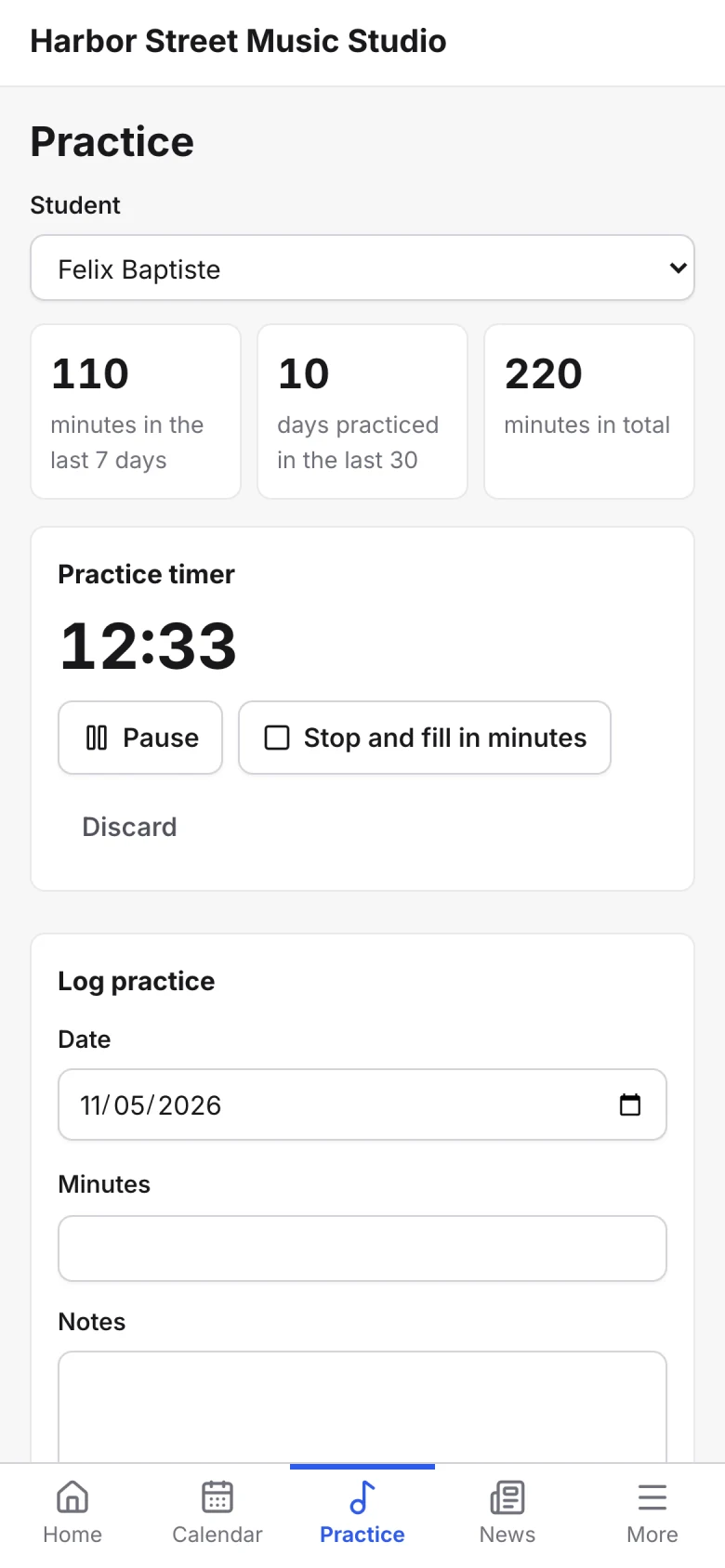
A practice entry can carry photos, recordings or PDFs for the teacher to hear or see, and if you allow it, families can email you from the practice log. Families also see each child’s pieces with their status and the notes you share, and you can pull a practice log summary of each student’s minutes over any dates, as PDF or Excel.
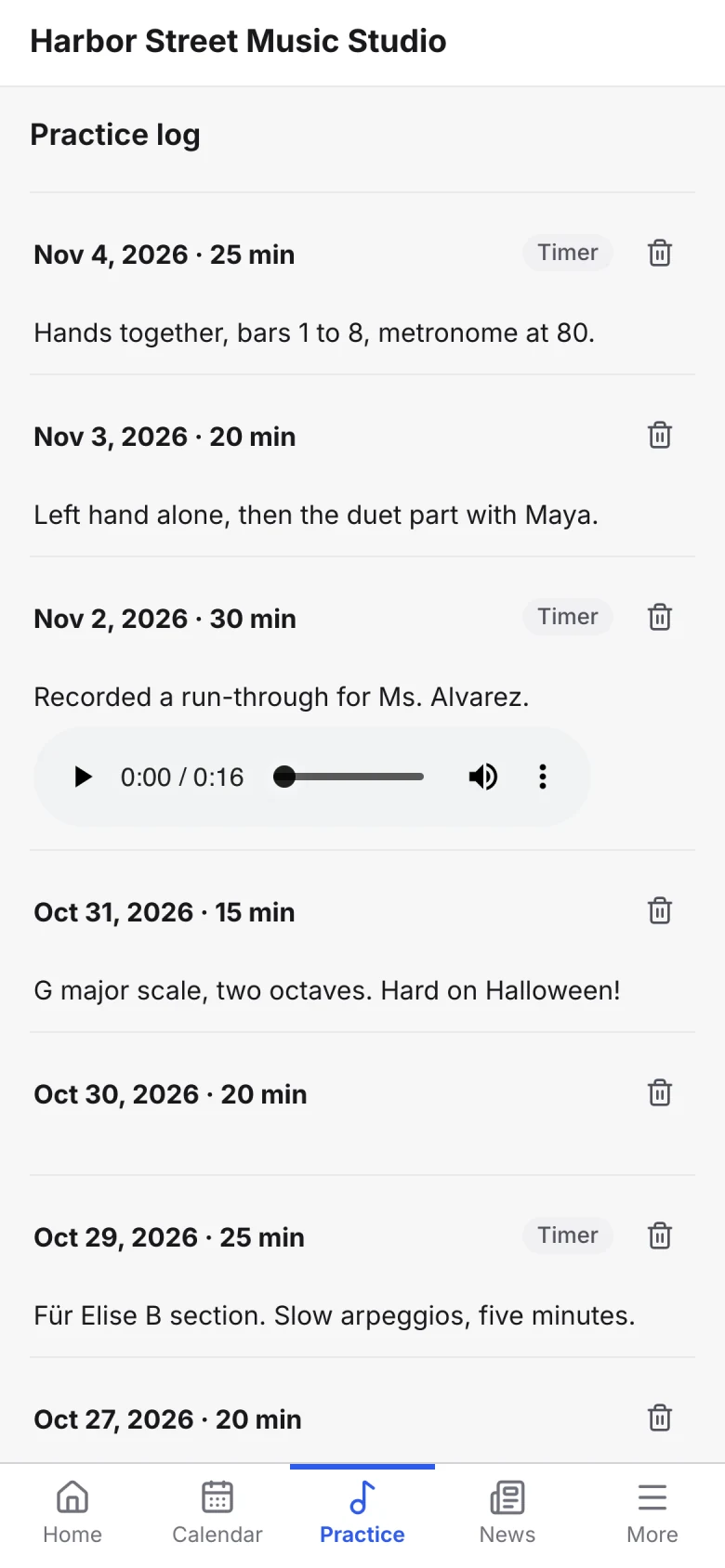
Platforms: any phone or computer browser, with nothing to download.
Price (as of November 2026): free for one teacher with every feature and unlimited students; each extra teacher, admin or staff seat is $5 a month.
Next step: see repertoire and practice logs for the full feature, or our comparison of studio software if you are choosing one.
Best for focused practice without games
Vivid Practice: focused practice without games
Vivid Practice comes from a piano teacher and takes the opposite approach to Practice Space: no games, four practice modes (blocked, interleaved, focused and a Pomodoro mode with breaks) and a clean student app. The teacher assigns work with audio, video and PDFs, can bulk-upload assignments from a spreadsheet, and answers students’ questions in direct messages. Students and parents can schedule reminders.
Best for: single-teacher studios that want focused practice without games.
Platforms: a student app on iPhone, iPad and Android, and a teacher portal.
Price (as of November 2026): free for a teacher with one student, then $9 a month for up to 10 students, $19 for up to 25, $29 for up to 50 and $39 for a school of up to 500.
Limits: Students must use the iPhone, iPad or Android app; there is no web version for them.
What about Simply Piano, Yousician and flowkey?
Simply Piano, Yousician and flowkey are learning apps, not practice trackers. They teach their own courses of songs and lessons (Yousician and flowkey give feedback as the student plays), and all three were active on the App Store in November 2026, free to download with paid subscriptions. They can add variety for a student who wants more songs, but they follow their own lesson order rather than your assignments, so treat them as extra playing time, not as part of the week’s practice plan.
Is there a free app like Simply Piano?
Partly. Simply Piano itself lets every user play two free courses. Hoffman Academy’s 400-plus video piano lessons are free, with a Premium plan for method books, games and play-along tracks, and Piano Marvel’s free plan has 150-plus songs, 200-plus lesson exercises and 25 video lessons. For guitar, Simply Guitar gives away the first part of its Guitar Basics I course. Beyond the free parts, each sells a paid plan.
What can a practice app not do?
A practice app counts minutes, but minutes are not the same as good practice. In a study by Duke, Simmons and Cash (2009), 17 graduate and advanced undergraduate piano majors practiced a hard passage and played it again the next day. How long they practiced, and how many times they played it, had no significant relationship with how well they played it the next day. What mattered was how they practiced: the share of their attempts that were correct.
So whichever app you choose, make the log ask what the student worked on and how, not only how long. A note that says “bars 9 to 12, hands separate, slow, three clean times in a row” tells you more than 30 minutes on a timer. For paper versions with those questions built in, see our free printable music practice log, and use a weekly lesson plan that ends with a clear assignment so the log has something specific to track.
How do you plan a practice session in an app?
Plan a practice session as a short list of items with a time for each, with the hardest spot near the start, rather than one block of minutes. A routine tells the student what to do next and gives the tracker something specific to record. Here is one to copy into a lesson note or a planner app; shorten every block for young beginners.
30-MINUTE PRACTICE ROUTINE

1. Warm-up (3 min): scales, long tones or a technical exercise,
   slow and even, with a metronome
2. Hardest spot first (10 min): the bars marked in the lesson,
   slow, hands or parts separate, until three clean times in a row
3. Whole piece (7 min): play it through once without stopping,
   then mark the places that broke down
4. Review or new (5 min): an older piece, sight-reading or a song
   the student chose
5. Record and log (5 min): record the hard spot once, listen back,
   and log what you worked on and how it went
Some apps build the routine for the student:
- Modacity works through a practice list with a timer and a recording for each item, and its deliberate practice mode steers the session toward the highest-priority pieces.
- Vivid Practice offers four modes: blocked (one item at a time), interleaved (switching between items), focused, and a Pomodoro mode with breaks.
- Practice Space lets the teacher send practice plans with step-by-step goals.
- Andante sets daily goals and a weekly plan, and Practis has a stopwatch or Pomodoro timer.
Trackers without a planner, such as My Music Staff’s and Sonely’s practice logs, work the same way if you write the routine into your lesson notes and ask the student to say in each practice note which items they did and how they went.
Which one should you choose?
- Young beginner, 5 to 8: no practice tool yet (a simple free metronome later), and a log a parent fills in fast: a paper chart, or a portal or app log.
- School band or orchestra student: TonalEnergy, plus MakeMusic Cloud if the school uses it.
- Teen piano or guitar student: Soundbrenner, plus Amazing Slow Downer or Moises for songs, and the studio’s tracker.
- Student who reads from an iPad: forScore.
- Adult learner: Modacity or Soundbrenner; a tracker is optional, since many adults keep their own log.
- Teacher whose students respond to rewards: Practice Space.
- Teacher who wants focused practice without games: Vivid Practice.
- Teacher who wants a free stand-alone tracker in the browser: Better Practice, where each student pays $4.25 a month.
- Teacher who wants practice next to lessons and billing: My Music Staff from $16.95 a month, with a long track record, or Sonely, free for one teacher.
Do the price math for your own studio. With 30 students, Vivid Practice is $29 a month, Practice Space Plus is $15.99 for one teacher, Better Practice is $127.50 a month if every student is on the $4.25 plan, My Music Staff is $16.95 with your scheduling and billing included, and Sonely is free for one teacher. For several teachers, add each app’s per-teacher price.