Quick answer
Track music lesson attendance with one status per lesson that records what happened and what it means for the bill: present, late, absent with notice, absent without notice, or cancelled by the teacher, plus whether a make-up credit was given or used. Keep make-up credits in their own ledger with an expiry date, and note who cancelled and how much notice they gave.
Key takeaways
- Record one status per lesson that says what happened and what it means for the bill and make-ups; a present or absent tick can’t answer the second question.
- Log each cancellation with who cancelled and the date and time the notice arrived, because the notice time decides whether it was inside your window.
- Make-up rules should set the notice needed to earn a credit, how long it lasts, how many a student can hold and how it is used.
- Treat teacher cancellations as a debt: the family is owed the lesson and should never lose it to an expiry date or a cap.
- A spreadsheet works for one teacher who invoices by hand; software pays off once one status has to reach invoices, make-up balances and teacher pay.
On this page
- Why do attendance records matter in a music studio?
- Which attendance statuses should you track?
- How do you track cancellations?
- What make-up credit rules hold up?
- Music lesson attendance sheet template (free to copy)
- How do you track make-up lessons?
- Should you track attendance in a spreadsheet or in software?
- Questions
To track music lesson attendance, record one status for every scheduled lesson on the day it happens: present, late, absent with notice, absent without notice or cancelled by the teacher, plus whether a make-up credit was given or used. A lesson’s attendance status decides what the family is billed, what the teacher is paid and how many make-ups the studio owes. Keep the record for every lesson, the same day, and most billing disputes never start.
Why do attendance records matter in a music studio?
Attendance records are the evidence behind every invoice, make-up and teacher payment in your studio. Without them, each question turns into your memory against a parent’s.
- Billing disputes. “We cancelled that lesson” is easy to settle when the record shows the date, who cancelled and how much notice they gave.
- Make-ups. You can only honor make-ups fairly if you know how many each student earned, used and still has.
- Payroll. If teachers are paid per lesson taught, attendance is the timesheet. A lesson marked wrong pays the wrong person.
- Progress. Notes taken with attendance show what was covered, so a substitute, a parent or you in six months can see where a student is.
- Patterns. Records show which students miss every third week and which time slots get cancelled most, which is what you need before you change a policy.
Which attendance statuses should you track?
Track one status per lesson that answers two questions at once: what happened, and what it means for the bill and for make-ups. A simple present or absent tick can’t answer the second question, and that is the one families ask about.
| Status | What happened | Billed? | Make-up credit |
|---|---|---|---|
| Present | The lesson was taught | Yes | No change |
| Late | Taught, but the student arrived late | Yes | No change |
| Absent, notice given | The family cancelled with the notice your policy asks for | Your policy decides | Your policy decides |
| Absent, no notice | A no-show or a last-minute cancellation | Yes | None |
| Cancelled by teacher | You cancelled | No, or billed with a credit | Given, if billed |
| Make-up taken | The student used a credit for this lesson | No, already paid | One used |
Record three more things with each cancellation: who cancelled, when they told you (date and time) and the reason if they gave one. The notice time is what decides whether a cancellation was inside your window.
How Sonely names the statuses
Sonely uses ten statuses besides Unrecorded, the state a lesson is in before anyone takes attendance. The ones marked ($) are billed.
| Status | What it does |
|---|---|
| Present ($) | Bills the lesson |
| Late ($) | Bills the lesson |
| Present, use make-up | Spends a make-up credit instead of billing the lesson again |
| Late, use make-up | Spends a make-up credit instead of billing the lesson again |
| Absent, notice given | Takes the charge off |
| Absent, no make-up ($) | Bills the lesson |
| Absent, issue make-up ($) | Bills the lesson and gives a make-up credit |
| Absent, use make-up | Spends a make-up credit |
| Cancelled, issue make-up ($) | When you cancel: bills the lesson and gives a make-up credit |
| Cancelled | When you cancel: takes the lesson off the bill |
Paid at lesson is a separate tick, for cash or a check taken at the lesson. Change a status later and Sonely undoes what the old one did to the bill and the credits, then applies the new one. See attendance and make-up credits.
How do you track cancellations?
Track cancellations by logging each one when it comes in, with the time the family told you, not the time you read the message. Your notice window (24 hours, for example) only works if you can show when the notice arrived.
CANCELLATION LOG

Date of lesson | Student | Cancelled by (family/teacher) | Notice received (date, time) | Hours’ notice | Reason | Outcome (credit / charged / removed)
---------------|---------|-------------------------------|------------------------------|---------------|--------|-------------------------------------
               |         |                               |                              |               |        |
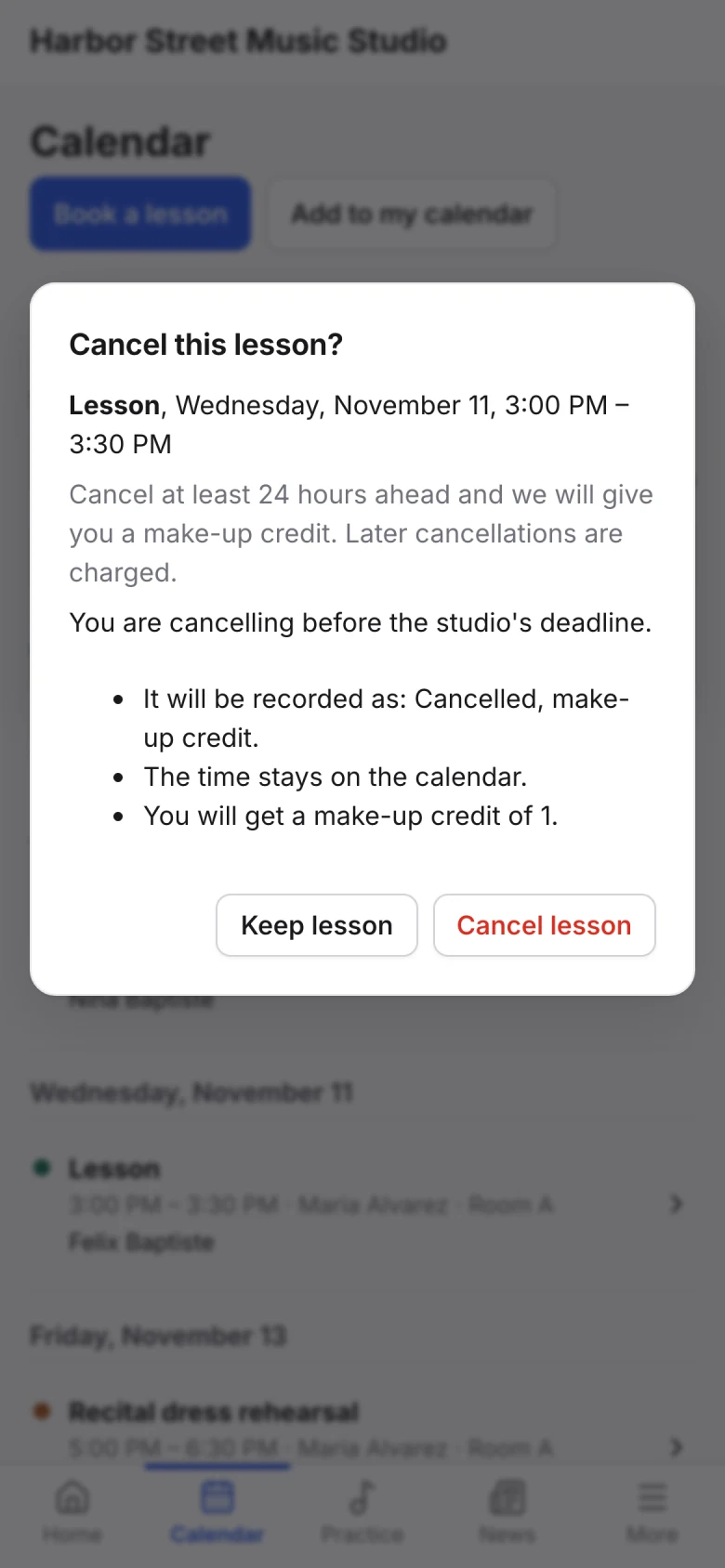
Ask families to cancel in one place, such as a text to one number, an email address or the family portal, so notice never sits unread in a channel you don’t check. In Sonely, you can let families cancel from the family portal before a deadline you set. Before it, a cancellation can give a make-up credit; after it, the lesson can still be charged. Families read your policy and see what will happen before they confirm.
What make-up credit rules hold up?
Good make-up rules say how a credit is earned, how long it lasts, how many a student can hold and how it is used. Write them in your policy before the term, so you apply the same rule to every family. Our music studio policy template has wording for each of these.
| Rule | Options | Why it matters |
|---|---|---|
| Notice to earn a credit | 24 or 48 hours | Gives you time to fill or rest the slot |
| Expiry | 30, 60 or 90 days, or the end of the term | Stops credits piling up into a debt you can’t schedule |
| Cap | One or two credits per term, or per month | Protects your week from a family who cancels often |
| Teacher cancellations | Always made up or taken off the bill, no cap, longer expiry | It is your cancellation, not theirs |
| No-shows | No credit | The time was reserved and wasted |
| How credits are used | Open slots, a make-up week, a make-up group class | Make-ups happen without extra evenings |
| Credits and cash | A credit is a lesson, not a refund | Keeps credits from turning into refund requests |
| Which teacher | Credits stay with the teacher who issued them | Each teacher’s week fills with their own make-ups |
Treat teacher cancellations as a debt you owe. If you cancel, the family is owed the lesson, and they should never lose it to an expiry date or a cap.
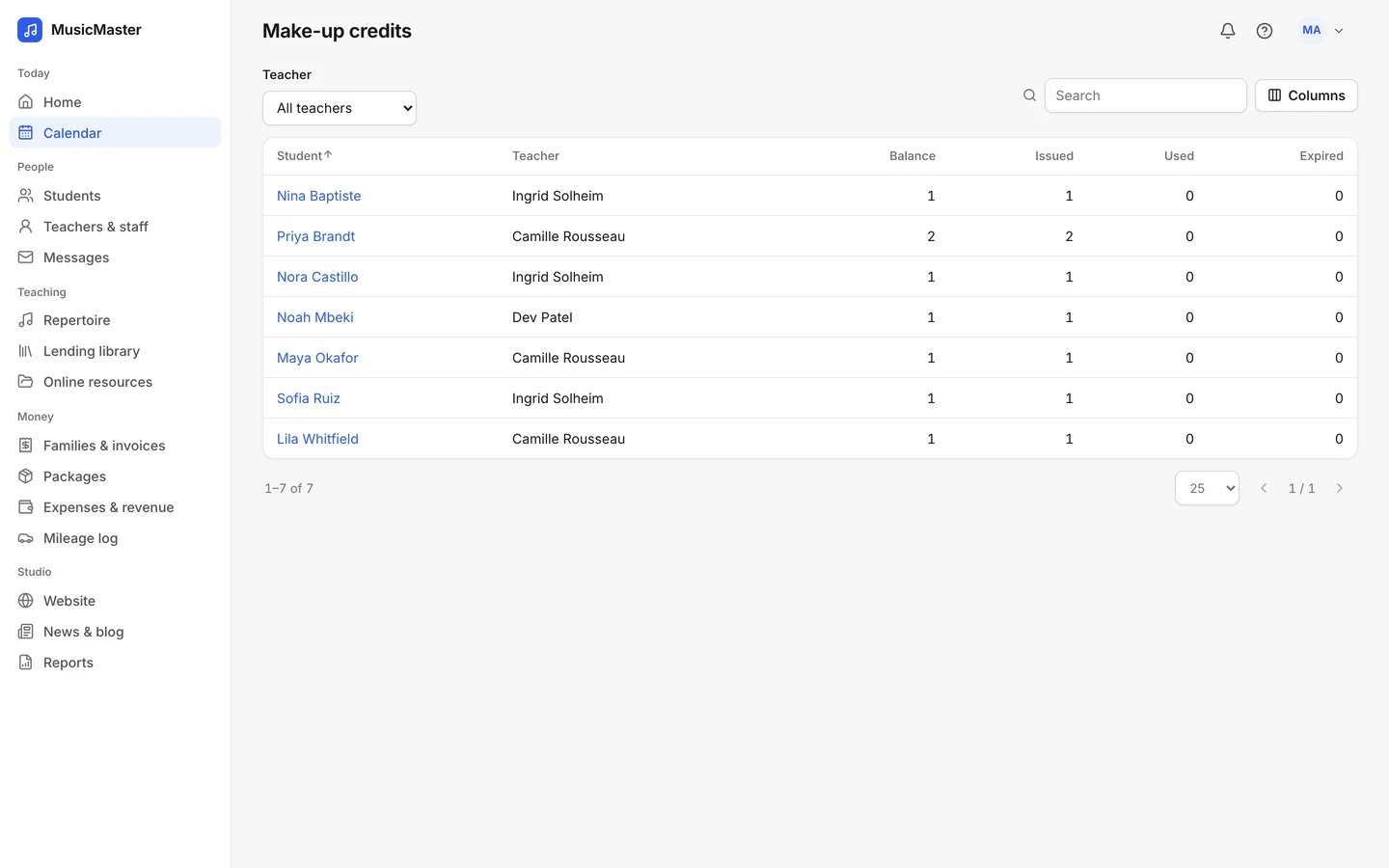
In Sonely, a make-up credit is worth one lesson at the student’s usual length, and each student’s balance is kept for each teacher. You can let unused credits expire after the number of days you choose and limit how many credits cancellations in the family portal can earn. Families see their credits in the portal and use them to book an open lesson, inside your rules. You can also run a make-up class, which students book with the credits they’ve earned with that teacher. For teacher pay, you choose whether a teacher is paid when a credit is issued or when the make-up is taught, in payroll.
Music lesson attendance sheet template (free to copy)
There are three sheets below: a monthly sheet for each teacher, a yearly attendance and payment record for each student, and a roster for group classes. Paste any of them into Word, Google Docs or a spreadsheet; in a document, a fixed-width font such as Courier New keeps the columns lined up. The monthly sheet and the yearly record also come as a printable PDF and a Word file, under each one.
Use the monthly sheet once per teacher per month. Fill it in on the day of each lesson, not at the end of the month, and keep the codes the same as your studio policy.
MUSIC LESSON ATTENDANCE SHEET

Studio: ______________________   Teacher: ______________________
Month: ____________   Lesson length: ________   Rate: ________

STATUS CODES
P    Present (billed)
L    Late (billed)
AN   Absent, notice given (per policy: removed or credited)
AX   Absent, no notice (billed, no credit)
AM   Absent, make-up credit issued (billed, +1 credit)
TC   Teacher cancelled (removed, or billed with +1 credit)
MU   Make-up lesson taken (not billed, -1 credit)

Date  | Student | Status | Notice (hours) | Credit +/- | Paid at lesson | Lesson notes
------|---------|--------|----------------|------------|----------------|--------------
      |         |        |                |            |                |
      |         |        |                |            |                |
      |         |        |                |            |                |

Totals this month
Lessons taught: ____   Billed: ____   Credits issued: ____   Credits used: ____
Here is what a filled-in week looks like:
| Date | Student | Status | Notice (hours) | Credit +/- | Paid at lesson | Lesson notes |
|---|---|---|---|---|---|---|
| Mon 3 | Maya L. | P | Minuet in G, hands together to bar 16 | |||
| Mon 3 | Leo R. | AN | 30 | +1 | Family trip, cancelled by text | |
| Tue 4 | Sam K. | AX | 1 | Cancelled at 3:10 for a 4:10 lesson | ||
| Wed 5 | Ava T. | L | Yes, cash | Arrived 10 minutes late, scales and sight-reading | ||
| Thu 6 | Noah P. | TC | 48 | +1 | Teacher ill, make-up offered | |
| Fri 7 | Leo R. | MU | -1 | Make-up for Mon 3, new piece assigned |
Yearly attendance and payment record for one student
A yearly record puts one student’s whole year on a page: every lesson’s status next to every payment. It answers the two questions a parent asks in June (how many lessons did we get, and are we paid up) without opening twelve monthly sheets.
LESSON ATTENDANCE AND PAYMENT RECORD
Student: ________________  Teacher: ______________  Year: ________
Lessons promised this year: [number]   Tuition: [$amount] per [month]

Month  | Status of each lesson   | Taught | Credits | Payment
       | (one code per lesson)   |        |  +/-    | (date, amount)
-------|-------------------------|--------|---------|---------------
Sep    | __  __  __  __  __      |        |         |
Oct    | __  __  __  __  __      |        |         |
Nov    | __  __  __  __  __      |        |         |
Dec    | __  __  __  __  __      |        |         |
Jan    | __  __  __  __  __      |        |         |
Feb    | __  __  __  __  __      |        |         |
Mar    | __  __  __  __  __      |        |         |
Apr    | __  __  __  __  __      |        |         |
May    | __  __  __  __  __      |        |         |
Jun    | __  __  __  __  __      |        |         |
Summer | __  __  __  __  __      |        |         |

Lessons taught: ____ of ____   Credits still open: ____
Tuition billed: ______   Paid: ______   Balance: ______
Use the same status codes as the monthly sheet, so a lesson is recorded once and copied, never re-decided.
Group class attendance roster
A group class needs one row per student and one column per class date, because the question is who came, not what each lesson cost.
GROUP CLASS ATTENDANCE      Class: ______________  Teacher: __________
Term: ______________        Day and time: ____________________________

Student            | Date: |      |      |      |      |      | Total
                   | _____ | ____ | ____ | ____ | ____ | ____ |
-------------------|-------|------|------|------|------|------|------
                   |       |      |      |      |      |      |
                   |       |      |      |      |      |      |
                   |       |      |      |      |      |      |

Codes: P present, L late, A absent, V visiting from another
section as a make-up
Class note sent to families: [ ] date ________
Group classes usually can’t be made up one student at a time, so say in your policy what a missed class earns: a seat in another section, a recording or worksheet, or nothing. In Sonely, a group class marks the whole class at once, and each student still keeps their own status, bill and make-up credits.
How to print the sheet or turn it into a spreadsheet
The PDF of the monthly sheet prints on one letter-size page with 19 lesson rows, and the Word file is the one to edit when you want to add your own codes, columns or logo. If you paste the text version into a document instead, turn the page to landscape so the notes column has room.
To keep attendance in Excel or Google Sheets, use one row per lesson and the same columns as the monthly sheet: Date, Student, Status, Notice (hours), Credit (+1 or -1), Paid at lesson and Lesson notes. Then:
- Make Status a drop-down list of your codes, so every lesson gets a valid one. In Excel, select the column and choose Data, then Data Validation, with Allow set to List. In Google Sheets, choose Insert, then Dropdown.
- Count lessons with COUNTIFS, which both programs have: it counts the rows that match every condition, such as one student and one code.
- Total make-up credits with SUMIFS, which adds a student’s +1 and -1 entries into a running balance.
- Pick one layout and keep it: a tab per month, or one sheet for the year with a filter on the date.
SPREADSHEET FORMULAS (students in column B, codes in C, credits in E)
Present lessons for one student:   =COUNTIFS(B:B,"Maya L.",C:C,"P")
Make-up credit balance:            =SUMIFS(E:E,B:B,"Maya L.")
How do you track make-up lessons?
Track make-up lessons in a ledger per student: every credit gets a line with the date it was issued, why, when it expires and when it was used. The balance is what families ask about, and the ledger is how you answer in one sentence.
MAKE-UP CREDIT LEDGER

Student: ____________________   Teacher: ____________________
Rules: credits expire ____ days after issue; maximum ____ per term

Issued     | Reason                         | Expires    | Used on    | Status
-----------|--------------------------------|------------|------------|----------------
           |                                |            |            | Open / Used / Expired
           |                                |            |            |

Balance today: ____ credits
Once a month, mark expired credits and send each family with an open credit a short reminder: how many they have, when they expire and how to book. A credit a family knows about gets used; a credit they don’t know about turns into a complaint when it expires.
Should you track attendance in a spreadsheet or in software?
A spreadsheet works for one teacher with a small, steady studio who invoices by hand. Studio software is worth it once attendance has to flow into invoices, make-up balances and teacher pay without you copying it across. The deciding question is how many places one status has to reach.
Studio management software such as My Music Staff and Sonely brings lessons, attendance and invoices together, so a status set in the lesson reaches the bill. Our roundup of the best music studio management software compares the options.
| Paper or spreadsheet | Studio software | |
|---|---|---|
| Cost | Free | A subscription, or a free plan |
| Setup | Minutes | Adding your students and lessons once |
| Billing | You count lessons and type invoices | Charges follow the status |
| Make-up credits | A separate ledger to keep in step | Issued, used and expired with each status |
| Teacher pay | You total each teacher’s lessons | Payroll follows attendance |
| Families | You send summaries by email | Families see records in a portal |
| Missed entries | Easy to miss until invoice day | Unrecorded lessons can be flagged |
| Several teachers | One sheet each, merged by hand | One system, with permissions |
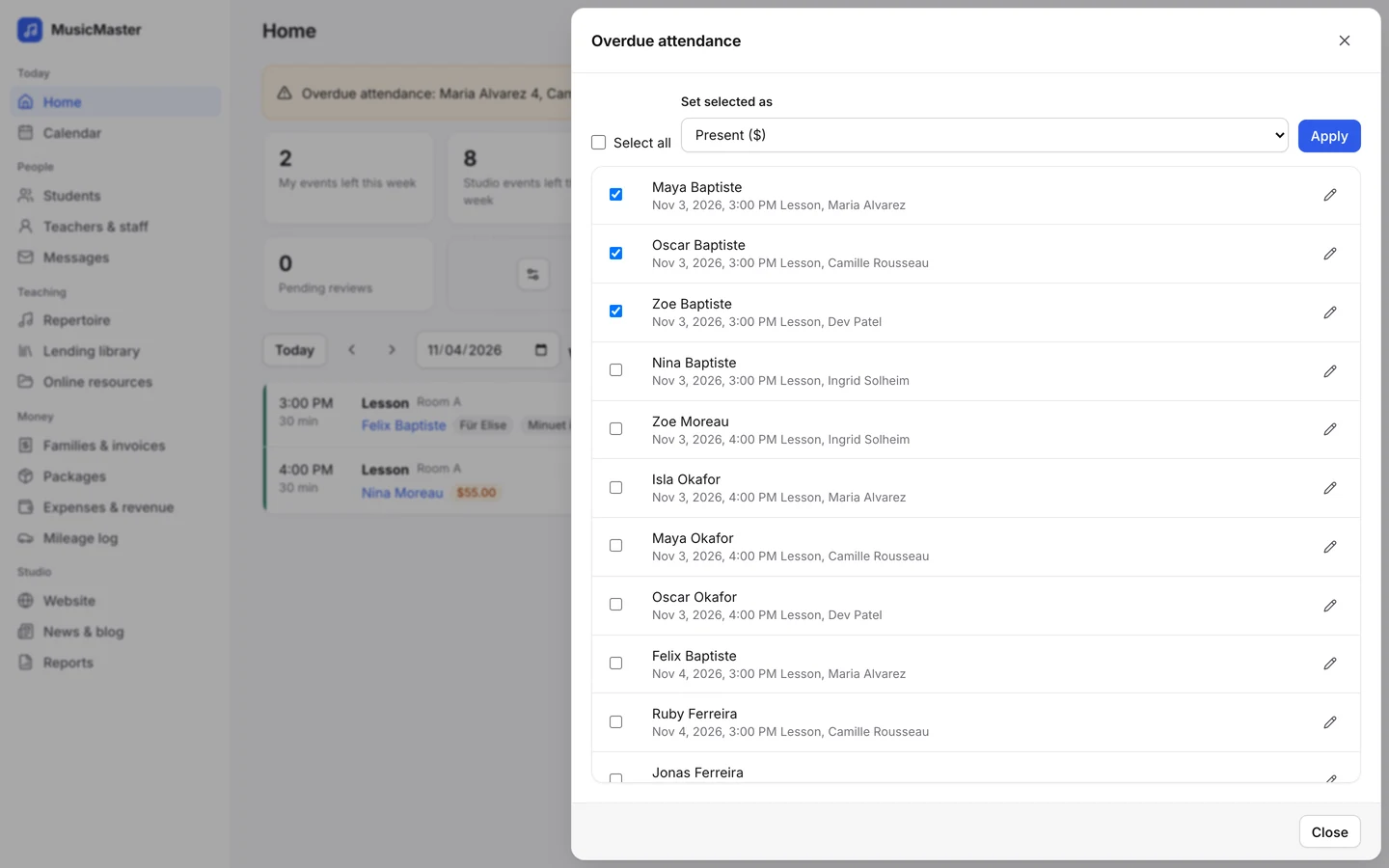
Sonely is built around attendance feeding everything else. Lessons that ended without attendance show in an Overdue attendance banner on the home page, for each teacher and for the office, and you can select them all, set them as Present ($) and apply. Each status flows into the family’s account, the teacher’s payroll and your reports, and the Student attendance, Lessons taught, Billable hours and Make-up credits reports download as PDF or Excel. Lesson notes can be emailed to the student or parent when you save, and families read them in the family portal. It is free for one teacher with every feature. For how attendance turns into invoices, see our guide to billing music lessons.